GCP Onboarding Process
Connect Google Cloud to Wiv with the in-app keyless wizard. Wiv creates a read-only service account and impersonates it — no JSON keys to download.
Written By Dotan Cohen
Last updated 21 days ago
GCP Onboarding Process
Connect Google Cloud to Wiv from Integrations → GCP → New GCP Integration. The wizard grants Wiv read-only access with no service account keys.
Need to upload a JSON key instead? Use GCP Onboarding Process (Manual).
What Wiv sets up
After you grant access, Wiv:
Creates or reuses a host project named
wiv-host-<organization>(for example, orgwiv.ai→wiv-host-wiv-ai). If you cannot create projects, you pick an existing project in the organization.Enables the APIs the host project needs (Service Usage, IAM, IAM Credentials, Cloud Resource Manager, BigQuery).
Creates or reuses a read-only service account with the
wiv-readonly-prefix.Grants viewer-only organization roles to that service account.
Grants impersonation so Wiv can use the service account without downloading a key.
Finds your BigQuery Cloud Billing export (or asks you to enter it) and finishes the integration.
Wiv never stores Google OAuth tokens or JSON keys on the integration. Customer GCP resources (host project, service account, IAM bindings) stay in your org if onboarding fails, is retried, or is cancelled.
Prerequisites
1. BigQuery Cloud Billing export
Wiv reads cost from a BigQuery billing export. If you do not have one yet, follow Google’s export guide and choose Detailed usage cost data.
Wiv prefers detailed tables (gcp_billing_export_resource_v1_*) over standard tables (gcp_billing_export_v1_*).
2. Permissions in Wiv
You need permission to create integrations in Wiv.
3. Permissions in Google Cloud
Sign in to Google as a user who can complete the grant for the selected organization. Typical needs:
Recommended predefined roles:
Organization-level IAM changes apply across the organization. Use least privilege, and only grant access for the organization you intend to connect.
Connect in Wiv
Sign in to Wiv and go to Integrations.
Click GCP, then New GCP Integration.
Follow the four wizard steps: Connect, Configure, Provision, Complete.
Connect
On Grant Wiv.ai access to GCP, click Grant Read Access.
Google asks you to authorize Wiv. The grant is read-oriented:
Read cloud metadata (organizations, folders, and projects)
Least-privilege roles only
No service account keys — nothing sensitive is downloaded
You can choose Onboard Manually at any time to use the JSON key path instead.
Configure
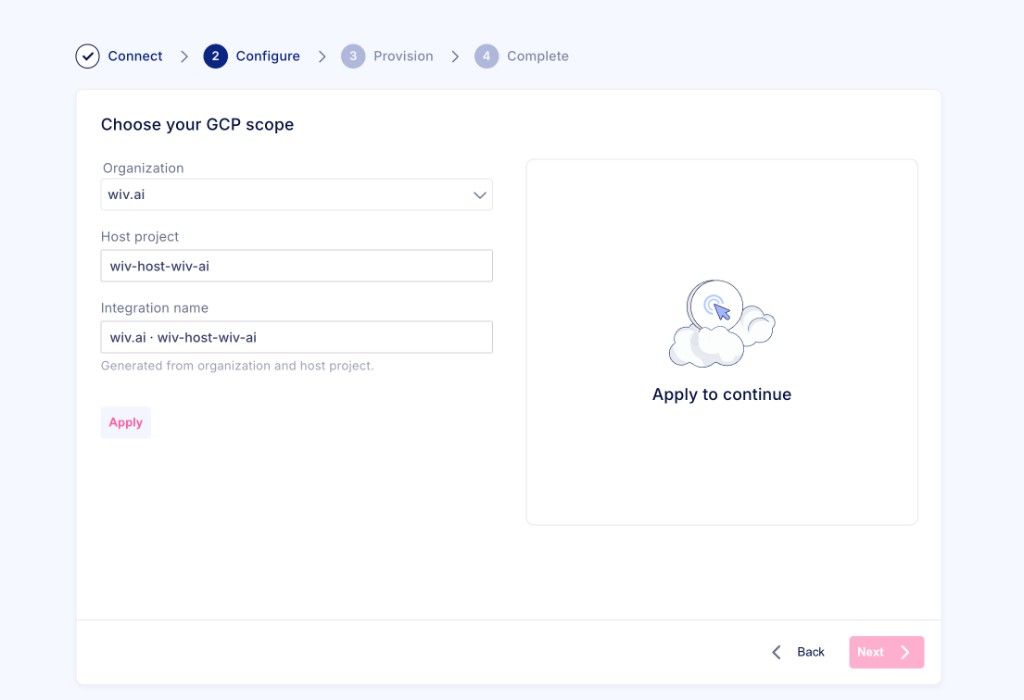
On Choose your GCP scope:
Select the Organization to connect.
Confirm the Host project. Wiv suggests
wiv-host-<organization>(for examplewiv-host-wiv-ai). If you cannot create projects, pick an existing project from the list.Confirm the generated Integration name (
Organization · host-project). It is created from the organization and host project.Click Apply. The panel shows Apply to continue until this succeeds.
Click Next.
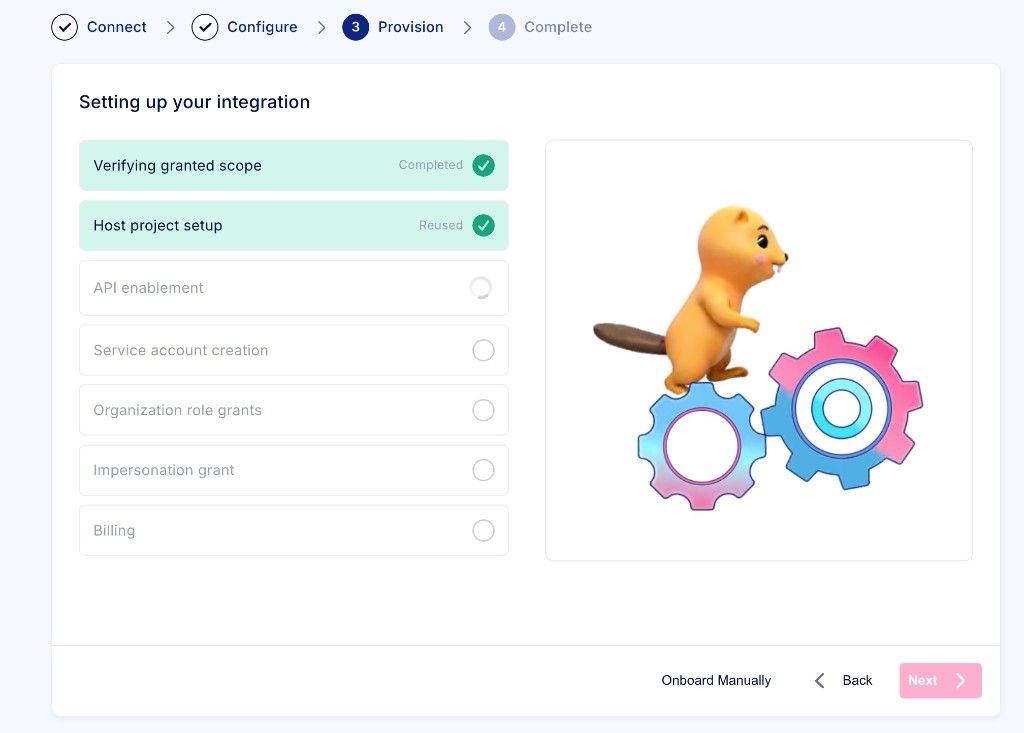
Provision
Setting up your integration lists each phase as it runs. Next stays disabled until setup finishes (or billing details are confirmed). You can still choose Onboard Manually or Back.
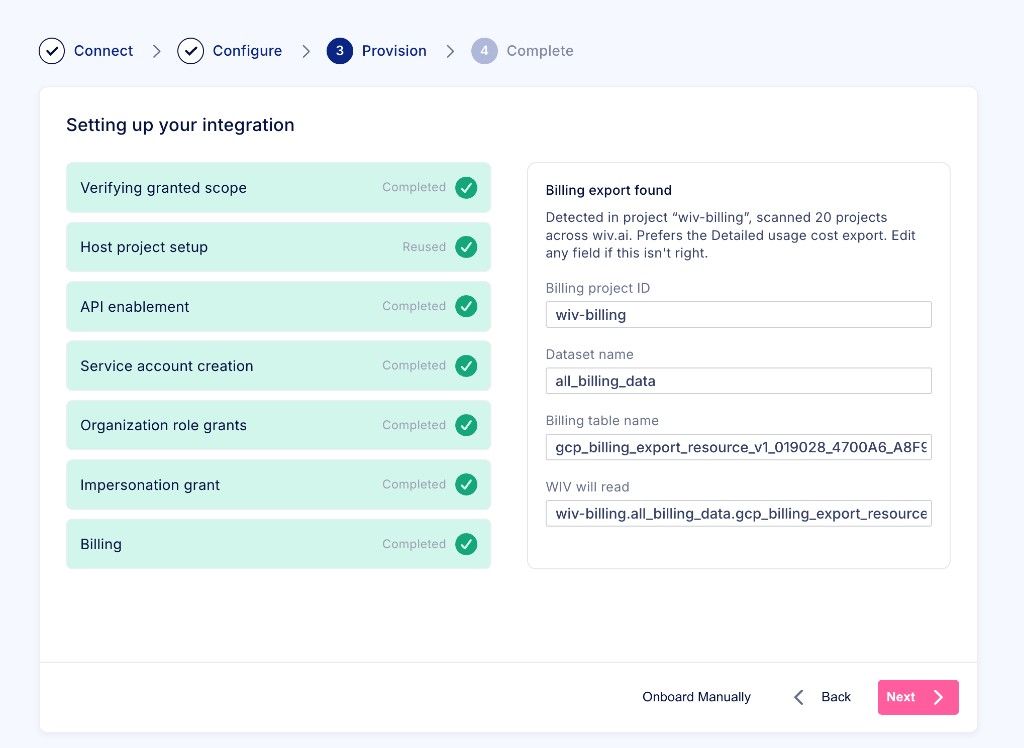
Billing export found
When a detailed usage cost export is detected, the panel shows Billing export found and fills:
Billing project ID
Dataset name
Billing table name
WIV will read — the
project.dataset.tablepath Wiv queries
Edit a field if this is not the export you want, then click Next.
No billing export found
If the scan does not find an export (it looks across projects visible to your grant, preferring names that include billing):
Confirm detailed usage cost export is enabled.
Click Retry Scan, or enter Billing project ID, Dataset name, and Billing table name yourself, then continue.
The wizard waits about a minute for the automatic scan before asking you to fill the fields. Onboarding cannot finish until those three values are set.
If a phase fails, use Retry when the UI offers it, or Onboard Manually. Wiv reuses the host project and service account on retry instead of deleting them.
Complete
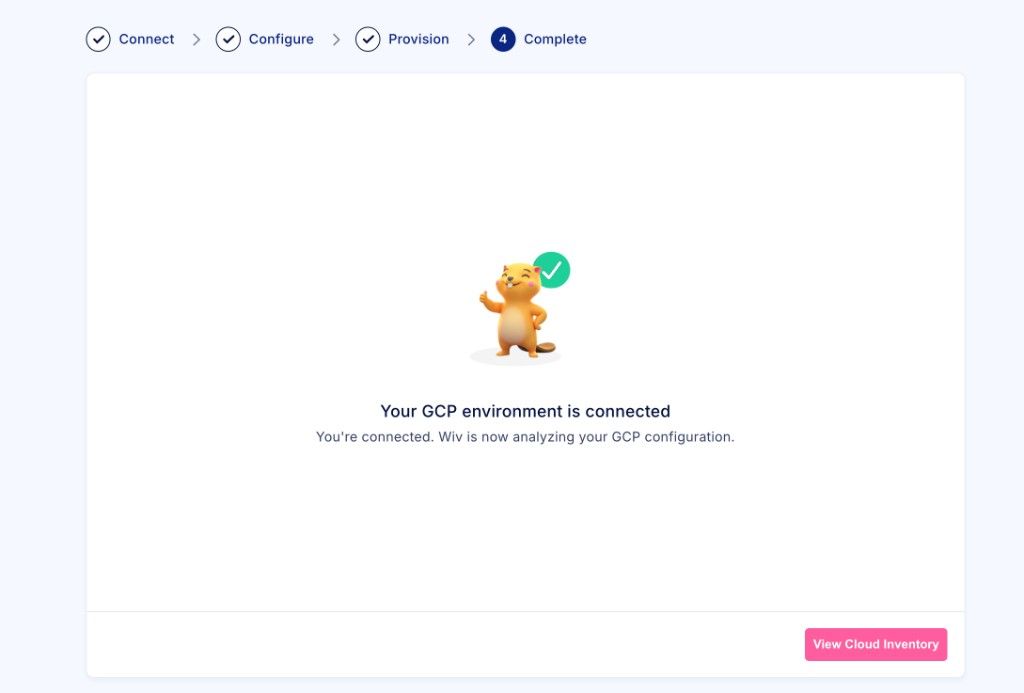
When setup succeeds you see Your GCP environment is connected. Wiv starts analyzing your GCP configuration. Click View Cloud Inventory to open the GCP integrations list.
After onboarding
Confirm the new GCP integration appears under Integrations → GCP.
In Google Cloud, confirm the host project and
wiv-readonly-…service account, and that viewer roles are assigned at the organization.For what each role is used for, see GCP Permissions List.
To add roles later, see Permissions Update GCP.
Application privacy policy
This Application Privacy Policy describes how Wiv Cloud Ltd. (“Wiv”, “we”, “us”) collects, uses, stores, and shares Google user data when you connect Google Cloud to Wiv through the GCP keyless onboarding flow (Google OAuth).
This policy applies specifically to the Wiv Google Cloud OAuth application used for GCP onboarding. It supplements Wiv’s general Privacy Policy.
Google user data we access
When you click Grant Read Access and authorize Wiv in Google, Wiv requests these OAuth scopes:
openidandhttps://www.googleapis.com/auth/userinfo.email— to identify the Google account that completed the grant (email address).https://www.googleapis.com/auth/cloud-platform— temporary access to your Google Cloud resources so Wiv can complete onboarding (list organizations/projects, create or select the host project, enable APIs, create a read-only service account, grant organization viewer roles, and allow Wiv to impersonate that service account).
How we use Google user data
We use Google user data only to:
Authenticate the administrator who starts GCP onboarding.
Provision the Wiv GCP integration in your Google Cloud organization (host project, read-only service account, IAM bindings, and billing-export discovery).
After onboarding, analyze your Google Cloud configuration and billing export for FinOps / cloud operations features inside Wiv.
We do not use Google user data to advertise to users, sell personal data, or train unrelated AI models on your Google account content.
How we store Google user data
OAuth access and refresh tokens are held only for the active installation session (encrypted at rest) and are deleted when onboarding finishes, fails, is cancelled, or the session expires. They are not stored on the lasting GCP integration record.
Service account keys are not downloaded or stored for keyless onboarding. Ongoing access uses service-account impersonation of the customer-owned
wiv-readonly-…account.Integration metadata needed to operate the product (for example organization/project identifiers, service account email, and BigQuery billing export project/dataset/table) is stored in Wiv as part of your tenant’s GCP integration.
Data protection mechanisms for sensitive data
Security procedures are in place to protect the confidentiality, integrity, and availability of Google user data processed by the Wiv Google Cloud OAuth application. In particular:
Encryption in transit: We use encryption (TLS/HTTPS) to protect Google user data and API traffic while it is transmitted between your browser, Google, and Wiv services.
Encryption at rest: We use encryption to protect sensitive installation-session data. Google OAuth access and refresh tokens are encrypted before storage for the duration of the onboarding session and are deleted when the session ends.
Access controls: Access to Google user data and GCP integration configuration inside Wiv is limited to authenticated, authorized users within your tenant and to Wiv systems/personnel who need that access to operate or support the service. Administrative and infrastructure access is restricted and logged.
Least privilege: After keyless onboarding, ongoing Google Cloud access uses impersonation of a customer-owned read-only service account rather than retaining end-user OAuth credentials on the lasting integration. Service account JSON keys are not downloaded or stored for this flow.
Session controls: Installation sessions that hold OAuth grants are time-bounded; tokens are removed when onboarding completes, fails, is cancelled, or the session expires.
Infrastructure security: Wiv runs on hardened cloud infrastructure with network controls, monitoring, and operational security practices designed to prevent unauthorized access, disclosure, alteration, or destruction of Google user data.
Sharing
We do not sell Google user data. We share it only with subprocessors that help us operate Wiv (for example cloud infrastructure providers), under contractual confidentiality and security obligations, or when required by law.
Retention and deletion
Installation-session OAuth tokens are removed as described above. Integration configuration and related operational data are retained while the GCP integration exists in your Wiv tenant and are removed or anonymized according to your account deletion / data-retention practices and our general Privacy Policy.
Your choices
You may revoke Wiv’s Google OAuth grant at any time in your Google Account permissions. You may also disconnect or delete the GCP integration in Wiv, and remove the host project, service account, or IAM bindings in Google Cloud.
Contact
Privacy questions: privacy@wiv.ai. Support: support@wiv.ai.
Application terms of service
These Application Terms of Service govern use of the Wiv Google Cloud OAuth application and the GCP keyless onboarding flow. They supplement Wiv’s general Website Terms of Use and any master subscription agreement between you and Wiv.
What the application does
The application lets an authorized Google Cloud administrator grant Wiv temporary OAuth access so Wiv can set up a read-only GCP integration: create or reuse a host project and wiv-readonly-… service account, assign viewer-oriented organization roles, grant impersonation to Wiv, and locate or confirm a BigQuery Cloud Billing export.
Your responsibilities
You represent that you have authority to grant organization- or project-level access for the Google Cloud organization you select.
You are responsible for reviewing the roles and resources Wiv creates or modifies in your Google Cloud environment.
You must keep BigQuery billing export configured if you want cost insights that depend on that export.
Access model
Keyless onboarding does not download JSON service-account keys to your workstation for storage in Wiv.
After setup, Wiv accesses Google Cloud by impersonating the customer-owned read-only service account, not by retaining end-user OAuth tokens on the integration.
Customer GCP resources created during onboarding (host project, service account, IAM bindings) remain in your Google Cloud organization if onboarding fails, is retried, or is cancelled.
Acceptable use
You may use the application only to connect Google Cloud environments you are authorized to manage, and only in accordance with Google’s terms, applicable law, and your agreement with Wiv. You may not misuse the OAuth grant to access data beyond the scopes you approved or outside the onboarding / integration purpose.
Disclaimer
The application is provided as part of the Wiv service. Except as stated in your commercial agreement with Wiv, the OAuth onboarding flow is provided on an “as available” basis, and Wiv is not responsible for Google Cloud outages, IAM propagation delays, or misconfiguration in your Google Cloud organization.
Contact
Questions about these terms: support@wiv.ai.